
- Parents who search for a school often see a map pack of nearby schools before any website, so your Google Business Profile does a lot of the work first.
- Pick the exact category, keep your details consistent everywhere and ask parents for honest reviews.
- Treat the website as an admissions tool: clear admission, fee and contact pages that load fast on a phone.
- If you are CBSE affiliated, the mandatory disclosure is a chance to publish readable pages instead of buried scans.
- Track form fills, calls and WhatsApp clicks so you know what actually brings enquiries.
While planning this post I searched for "best cbse school in ghaziabad" from Ghaziabad. The first thing Google showed me was not a website. It was a map with three schools, their ratings and a line from a parent review. That is where I would expect many parents to start their shortlist, and most school websites never get a chance to compete for that spot.
This guide covers what I would fix first if I were looking after a school's search presence. It is written for school owners, principals and the people who manage their websites in India.
What parents see first
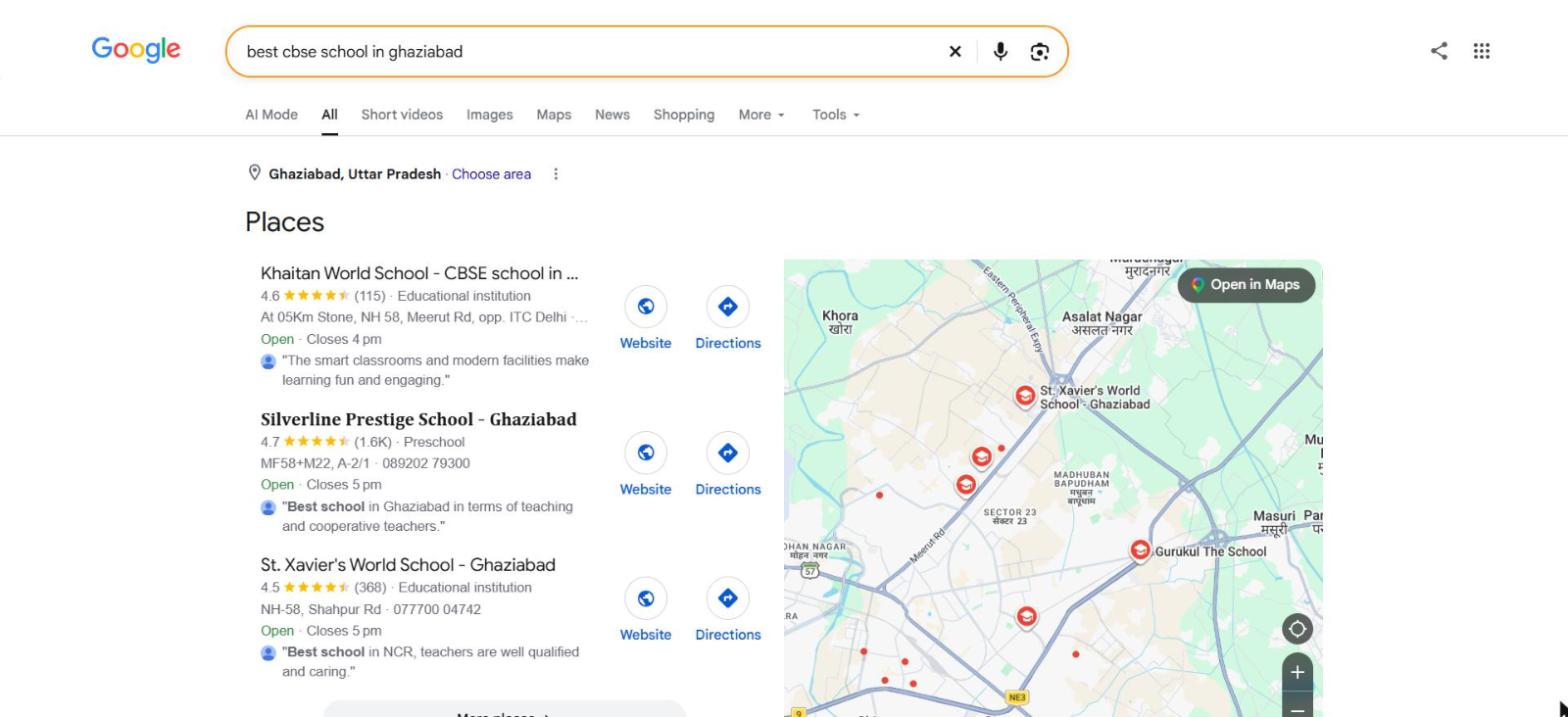
Look at what each listing shows: a star rating with the number of reviews, a category label such as "Educational institution" or "Preschool", an address, opening hours and a short review quote. A parent can compare three schools in a few seconds without opening a single website. That is why I start with the Google Business Profile, not the website.
Set up your Google Business Profile
These are the things I would check on a school's profile, in this order:
- One profile per campus. Claim and verify the profile, and do not create duplicates for the same campus. Duplicates split reviews and confuse parents.
- The right primary category. The published Google category list includes CBSE school, ICSE school, Primary school, Higher secondary school, Nursery school, Preschool, Montessori school, Boarding school and Co-ed school, among others. Choose the one that best describes your school, then add secondary categories only if they are true. Check the dashboard itself, since Google can change the list.
- Your real name. Use the name on your signboard and affiliation letter. Adding keywords such as "best school in Ghaziabad" to the name can get the profile suspended. If that has already happened, read my post on what to do when your Google Business Profile is suspended.
- Matching details. The address, phone number and website should be identical on the profile, the website, your social pages and any directory listing.
- A useful website link. I would point it to the admissions page or the homepage, whichever answers a parent's question faster.
- Real photos. Classrooms, labs, library, playground, school buses and the entrance. Parents like to see the actual place.
- Posts. Use them for admission dates, open days and events, with a clear next step.
On reviews, ask parents you know are happy and make it easy with your review link, which you can create with my free Google review link and QR code generator. Reply to every review, the good and the bad, in a calm and polite tone. Do not offer gifts, discounts or fee concessions in exchange for reviews, and do not write reviews yourself. It is against Google's rules and it can damage trust if parents find out.
If you want help with this part, it is exactly what our local SEO services cover.
Use the CBSE disclosure well
In January 2026, CareerIndia reported that CBSE had told affiliated schools to publish certain information on their websites. The list in that report covers general information such as the school name, address, affiliation number, school code and the running trust or society. It also covers documents such as the affiliation letter, registration certificate, state NOC, recognition certificate and the building, fire and sanitation certificates. Then come academics, including classes, curriculum, fee structure, academic calendar, textbook list and board result information, a list of teaching and non-teaching staff, and infrastructure details such as classrooms, labs, library and safety features. The report says non-compliance may lead to penalties or action under the affiliation rules.
I am an SEO consultant and not a compliance advisor, so please read the current CBSE circular for the exact requirements, and note that other boards have their own rules. What I can say from the SEO side is that you may as well do it in a way that helps parents and Google:
- Create one clear page for the disclosure and link to it from the footer.
- Put staff lists, fee structure and facilities in plain HTML text and tables so they can be read and indexed. Keep scanned PDFs for the certificates only.
- Show a last updated date on the page and keep it honest.
- Use the same school name, address and phone number you use on your Google Business Profile.
Pages every school site needs
Parents are looking for answers, and each question should have a page that answers it.
| Page | What parents look for | SEO note |
|---|---|---|
| Admissions | Which classes are open, how to apply, documents needed, key dates | Keep it as an HTML page, not only a brochure PDF. Add an enquiry form and a phone number. |
| Fee structure | What each class costs and what is included | Publish it as a table you can update. CBSE has listed fee structure among the things to disclose. |
| Facilities | Labs, library, sports, transport, safety | Use real photos with descriptive file names and alt text. |
| Academics | Board, curriculum, classes offered, activities | Mention the board name and class range in plain words. |
| Staff | Who teaches, qualifications and experience | A readable list is better than an image or a scanned file. |
| Contact | Address, phone, map, directions | Match your Google Business Profile exactly and embed the map. |
Put the board, the area and the school name in your page titles so each page is clear in search results. Keep the wording natural.
Technical basics
- Mobile speed. School galleries are often heavy. Compress images and check your pages on a phone. My post on Core Web Vitals explains what to measure.
- Indexing. Make sure admission and fee pages are not set to noindex by mistake, which happens when a staging setting is left on. Submit your sitemap in Search Console.
- Structured data. Schema.org has a
Schooltype, a kind ofEducationalOrganization, with properties such as name, address, telephone, url, sameAs, description and image. Fill in the ones that are true for your school and test the page. My post on what schema markup is covers the basics. - A basic audit. Use my SEO audit checklist to catch broken links, duplicate titles and missing pages.
Content that brings enquiries
You do not need a blog with daily posts. A few useful pages do more than a large number of thin ones:
- An admission process guide that lists your own steps, documents and dates.
- Age criteria and class eligibility, written from your own policy. These differ by state and board, so never copy another school's numbers.
- A "how to choose a school" page written honestly, with the questions parents should ask any school.
- Events and achievements with real photos. Get written consent from parents before you publish a child's name or photo. India has a data protection law with rules on children's data, so ask your legal advisor what applies to you.
- Area pages only if you really serve those areas, for example with bus routes. Copying the same page for ten localities does not help.
Track your enquiries
Do not stop at rankings. You want to know how many form fills, calls and WhatsApp clicks come from search, and which pages produce them. I explain how to set this up in my post on GA4 key events for forms, calls and email clicks. If parents message you on WhatsApp, my WhatsApp chat link generator builds the link, with a ready-made message, and a QR code you can print for the school gate or a flyer. Also add a "How did you hear about us?" field to the enquiry form. The answers will tell you things analytics cannot.
A 30 day plan
| Week | What to do |
|---|---|
| Week 1 | Claim and verify the Google Business Profile, fix the category, name, address and phone number, and add real photos. |
| Week 2 | Publish clean admissions, fees and contact pages. Set up the disclosure page if you are CBSE affiliated. |
| Week 3 | Fix speed, indexing and sitemap issues. Add School schema and test it. |
| Week 4 | Set up enquiry tracking, start asking parents for reviews and reply to every review. |
Mistakes I would avoid
- Putting the whole disclosure into one large scanned PDF that nobody can search.
- Creating a second Google Business Profile for the same campus.
- Adding keywords to the business name on Google.
- Buying reviews or offering incentives for them.
- Burying the admission page three clicks deep.
- Publishing student names or photos without consent.
Want help with your school's search presence?
We look at your Google Business Profile, website and enquiry tracking and tell you what to fix first. See our local SEO services or our SEO services.
Talk to Us About School SEOFAQ
How long does SEO take to work for a school?
It depends on how competitive your area is and what you start with. Google Business Profile changes and review growth can show movement sooner than website rankings. Start well before your admission season, because reviews and rankings take time to build.
Does a school need a website if it has a Google Business Profile?
Yes. The profile gets you into the map results, but parents who want fees, facilities, admission steps and staff details will look for a website. Google also needs a good website to understand what the school offers.
Which Google Business Profile category should a school choose?
Choose the one that matches how you describe yourself, such as CBSE school, ICSE school, Primary school, Higher secondary school, Nursery school or Preschool. Look at what your closest competitors use, but do not copy a category that does not fit.
Should we publish the CBSE mandatory disclosure on the website?
If your school is CBSE affiliated, CBSE has asked affiliated schools to publish this information on their websites. I am an SEO consultant, not a compliance advisor, so check the latest CBSE circular for exact requirements. For SEO, a readable page is better than one huge scanned file.
Can we put student photos and results on the website?
Get written consent from parents before you publish names or photos of students. India has a data protection law with rules on children's data, so ask your legal advisor what applies to your school before you publish anything that identifies a child.
Should we write content in Hindi as well as English?
If many of your parents search or read in Hindi, a Hindi version of your admission and fee pages is worth considering. Check your own Search Console queries and enquiry forms to see which language your parents use.