
Your Google Business Profile is suspended, the calls have dried up, and you want it back as soon as possible. I get it. But before you click anything, know this: Google lets you appeal each decision only once. So the order you do things in matters more than how fast you do them.
Fix first, appeal second. That’s the whole idea, and the rest of this guide is the detail.
To write it, I went through Google’s own help pages and the guides that rank for this topic right now, and I opened the appeals tool on my own account to see what it shows. Where Google doesn’t give an answer, like how long a review takes, I’ll say so instead of guessing.
The short version
- Open the appeals tool and read the decision, the reason and the policy.
- Check that your whole Google account isn’t restricted.
- Find what broke the rules, fix it, and make your website match your profile.
- Collect documents that show your business name and address.
- Send one short, honest appeal.
- Wait for the email. If it’s a no, you still have options.
What “suspended” actually means
Google itself only says a profile is “suspended” or “disabled”. Soft and hard suspension are terms the SEO world uses, not Google. They’re still handy, because you’ll feel the difference.
| Soft suspension | Hard suspension | |
|---|---|---|
| What you see | A suspended notice, but the listing may still show on Maps and Search | The profile is removed and customers can’t find it |
| What you can do | Usually can’t edit or manage the profile | Can’t get into the profile at all |
| Typical cause | Guideline problems found after a change or review | A serious or repeated violation |
Whichever you have, the first move is the same: open Google’s appeals tool and look at the decision. It tells you the date, the reason, the policy behind it, and whether you can appeal at all. The status will be one of these:
| Status | What it means for you |
|---|---|
| Eligible for appeal | You can send your one appeal now |
| Submitted | It’s with Google. Don’t send another |
| Approved | The profile is coming back |
| Not Approved | Read the reason, then plan an additional review with new evidence |
| Can’t be appealed | Google won’t take an appeal for this decision. There’s a section on this further down |
One special case: an account restriction. If Google restricts your whole account, every profile you manage is suspended and you can’t create or claim new ones. Appeal the restriction first, on your My accounts page. Only once it’s lifted can you appeal the profile.
Why profiles get suspended
Google rarely tells you exactly what you did wrong, so this part is detective work. Put its Business Profile guidelines next to your profile and go line by line. From my reading, these are the usual suspects.
The business name comes first. It has to match your signboard and your website, nothing more. Turning “Sharma Dental Clinic” into “Sharma Dental Clinic – Best Dentist in Noida” is the classic mistake. Taglines, phone numbers and URLs don’t belong in the name either.
Then the address. A virtual office or a rented mailing address doesn’t qualify, and neither do P.O. boxes or remote mailboxes. If you go to your customers and don’t have a place they visit, hide the address and set a service area. Google suggests keeping that within about two hours of driving.
A few smaller things also get a profile looked at: too many categories, or vague ones; links, prices or offers in the description; two profiles for one location; and details that don’t match between your profile, website and paperwork. And if you changed the name, address or category on a new profile just before the suspension, look there first.
How to reinstate a suspended profile, step by step
Step 1: Open the appeals tool
Open Google’s Business Profile appeals tool and sign in with the account that manages the profile. The first screen just asks you to confirm which account you’re using.
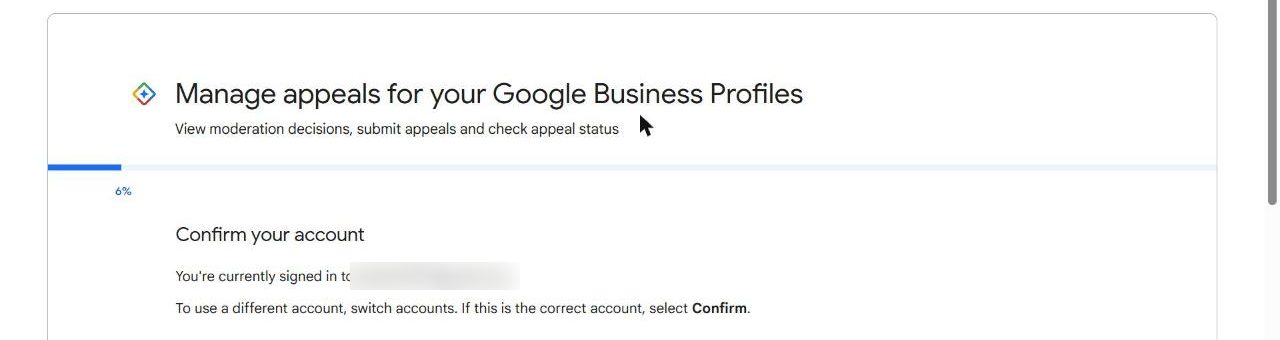
Next you pick the profile you want to look at. If you manage several, double-check you’ve chosen the right one.

When I did this for my own profile, the tool said there was nothing to appeal, which is exactly what you want to see. If yours is suspended, you’ll see the decision here instead, with its date, reason and policy. Write those down before you touch anything.

One honest note: my profile isn’t suspended, so I haven’t sent an appeal myself. The screens after this, with the evidence upload and the text box, are described from Google’s help page, not from my own screen.
Step 2: Check the account
If your whole Google account is restricted, appeal that first on the My accounts page. Appealing the profile while the account is restricted won’t get you anywhere.
Step 3: Find what broke the rules
Go through your profile in this order:
- Is the business name exactly what’s on your signboard and website?
- Is the address a real place where you work, not a virtual office or mailbox?
- If customers don’t visit you, is the address hidden?
- Is the main category specific, with only a few extras?
- Does the description have any prices, offers or links in it?
- Is there another profile on Maps for the same business or address?
Step 4: Fix it before you appeal
Correct whatever you found, then make your website agree with the profile: the same business name, address and phone number in the header, footer and contact page. If you have a physical location, add a clear photo of the signboard and entrance. I’d spend the most time here. The person reviewing your appeal is mostly checking whether your public details tell the same story.
Step 5: Gather proof
Google accepts documents that show your business name and address: official business registration, a business license, tax certificates, and utility bills for electricity, phone, water or internet. The name and address on each one should match your profile exactly. Even “Sector 44” against “Sec 44” can raise a doubt, so read them carefully.
Google doesn’t publish an India-only list. For Indian businesses, this is what I’d reach for:
| Document | What it proves | Watch out for |
|---|---|---|
| GST registration certificate | Business name and registered address | The address may differ from where you actually work |
| Udyam registration | Business name and address | The name must match the profile exactly |
| Shop and Establishment licence | Business name and address | Check it hasn’t expired |
| Electricity or internet bill | The address in a recent period | It should carry the business name or the owner’s name |
| Rent agreement | Your right to use the address | Treat it as support, not your only document |
| Photos of signboard and entrance | The real-world name and location | The name on the board must match the profile |
Step 6: Run a last check
You only get one appeal per decision, so go through this before you submit.
- I’ve read the decision, reason and policy in the appeals tool
- My Google account has no restriction
- The business name matches my signboard and website
- The address is real, not a virtual office or mailbox
- My website shows the same name, address and phone number
- There’s no duplicate profile for this business
- My documents show the same name and address as the profile
- My appeal text is short, factual and polite
Step 7: Write the appeal
Say what the business does, what you found, what you fixed, and ask for the profile back. A few plain sentences is plenty. Skip the arguing and skip the long story. Something like this:
We run a digital marketing agency from the address on our profile. Our business name had extra keywords in it, and we’ve changed it to match our signboard. We’ve attached our registration and a recent utility bill showing the name and address. Please review and reinstate the profile.
Upload your evidence, tick the readiness box, and submit. Then leave it alone. Don’t create a new profile for the same business while you wait, because Google asks owners not to, and a duplicate can make things worse. Google emails you the decision, and the status also shows in the appeals tool.
What happens after you appeal
Google’s help page doesn’t say how long a review takes. Other guides I read quote 3 to 7 business days for a first appeal, and one describes a newer process that can run 25 to 30 business days. So think of it as anywhere from a few days to several weeks. It depends on the case and how clear your evidence is.
While you wait, don’t edit the profile and don’t send extra appeals. Keep your documents together in one folder, and check the email linked to the profile, including spam.
If you’re approved, the profile comes back. Check the name, address, hours and categories, and leave them exactly as you fixed them.
If you’re not approved, read the reason in the tool. You can ask for an additional review, but only with new evidence that wasn’t in your first appeal. Sending the same documents again changes nothing. Work out what was missing, for example a document with a slightly different address, fix that, and then use Google’s contact form for local appeals.
Asking the Google Business Profile Community
Many owners also post their case in the Google Business Profile Community, where Product Experts can look at it and pass it to Google. It’s a commonly used step, not an official part of the process, so I’d try it only after the appeals tool and the additional review. Keep your post short and factual, and don’t put private documents in a public thread. If you’re in the European Economic Area, you may also have extra options under the EU Digital Services Act.
If the status says “Can’t be appealed”
It means Google won’t take an appeal for that decision through the tool. Here’s the order I’d work through:
- Make sure you’re signed in with the right account and picked the right decision.
- Check there’s no account restriction. If there is, appeal that first.
- Check whether you’ve already used your one appeal on this decision.
- Read the policy named in the decision. A business with no real location, such as a virtual office, may simply not qualify.
- If the business is eligible, ask in the Community with a short summary and the decision details.
If the business doesn’t meet Google’s rules, more appeals won’t help. That time is better spent on your website, local directories and an address you actually work from.
How to avoid a suspension next time
Most of it comes down to keeping things boring and consistent. Use your real business name, with no keywords added. Use an address where you actually work. Keep your name, address and phone the same on your profile, website and directories. Change one thing at a time, especially on a new profile, and look at the profile the next day to make sure it’s still live.
Two habits that save you later: keep a folder with your registration, licence, a recent utility bill and photos of your signboard, and make sure the email on the profile is one you check, with a trusted second person added as an owner or manager so one lost login doesn’t lock you out.
A healthy profile also helps your local rankings. If you want to go further, I’ve written about how to rank in Google Maps without a storefront.
Frequently asked questions
Is a suspended Google My Business profile the same thing as a suspended Google Business Profile?
Yes. Google renamed Google My Business to Google Business Profile, but plenty of people still say GMB. The process in this guide applies to both.
How long does Google take to reinstate a suspended profile?
Google doesn’t publish a timeline. The guides I read quote anything from a few days to several weeks.
Can I appeal more than once?
Each appeal can be submitted only once. If you’re not approved, you can ask for an additional review, but only with new evidence.
Should I create a new profile while I wait?
No. Google asks owners not to, and a duplicate can create fresh problems.
Why did my profile get suspended after a small edit?
Changes to the name, address or category can bring a profile up for review. If the edit broke a guideline, the review can end in a suspension. Undo or correct it before you appeal.
Does a suspension hurt my website rankings?
It affects your Maps and local results, not your website’s organic rankings directly. Your website can keep bringing in leads while the profile is down.
Can I pay someone to get it reinstated?
You can, but the process is the one in this guide and nobody can guarantee approval. Be careful with anyone who promises it.
Want me to look at your profile before you appeal?
You only get one appeal for each decision. If you’d like a second pair of eyes on your profile, website and documents first, book a call or send me a message.
Book a callContact meSources: Fix suspended or disabled profiles, Google Business Profile Help and Guidelines for representing your business on Google. Review times and the Community step come from other published guides, not from Google.