
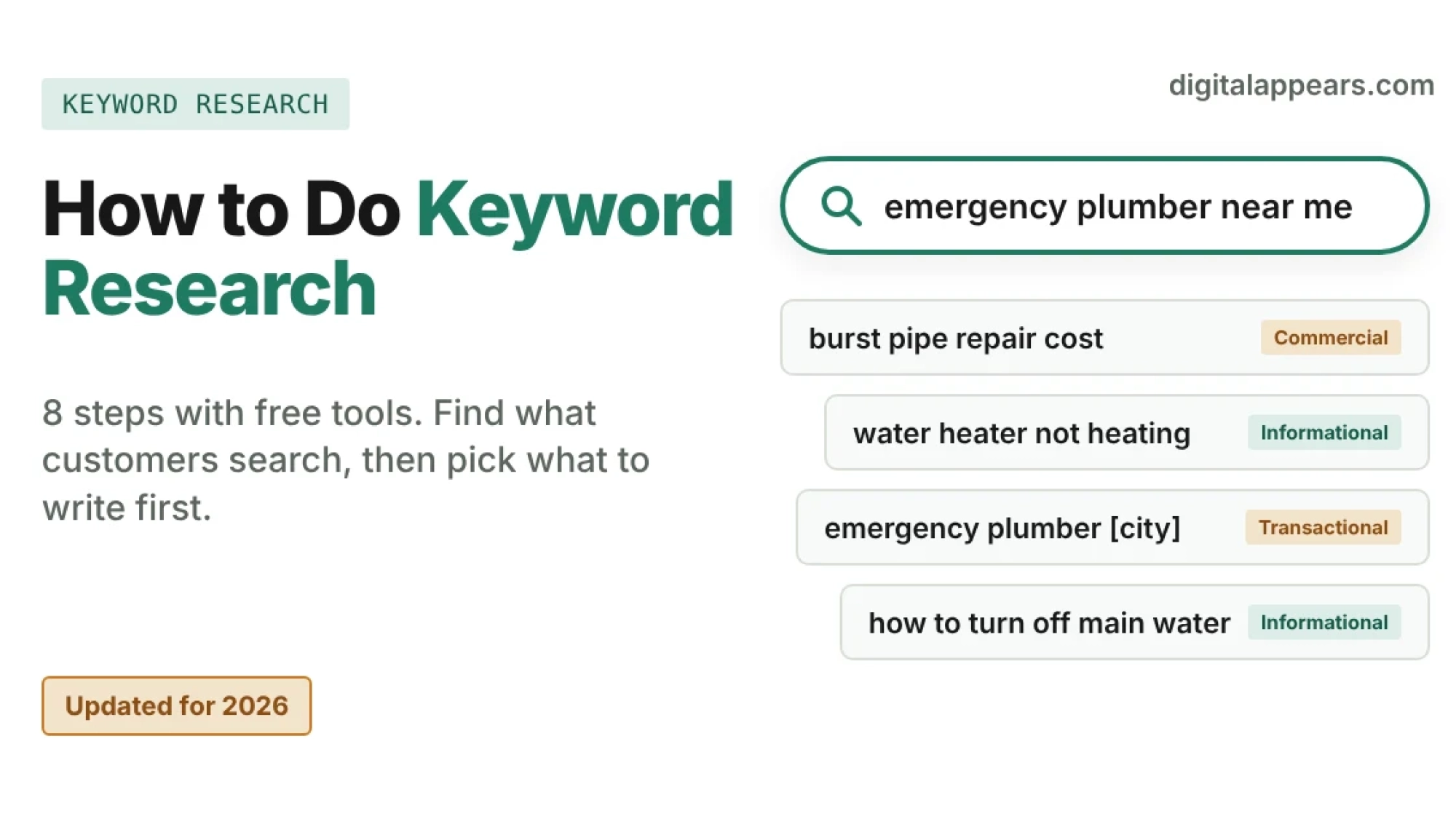
- Keyword research means finding the words your customers really search for, then choosing which ones are worth a page. You don't need paid software to do it well.
- Follow 8 steps: set goals, brainstorm topics, expand with free tools, check search intent, judge demand, judge competition, group keywords into pages, then prioritize.
- Search intent matters more than search volume. A keyword with modest volume and clear buying intent often beats a high-volume one that attracts the wrong people.
- Your best free data source is Google Search Console, because it shows the real queries your site already appears for.
- Volume figures from any tool are estimates. Use them to compare keywords, not as promises.
What keyword research is (and isn't)
Keyword research is finding the phrases people type into search engines when they're looking for what you offer, then deciding which of those phrases to build pages around. Done well, it tells you three things: what your audience wants, how they word it, and which topics you have a realistic chance of ranking for.
It isn't a hunt for the single highest-volume term. Modern search engines understand topics and meaning, so a page isn't tied to one exact phrase. Think of keyword research as a way to understand your customers and plan your content, not as a list of words to repeat. If you're new to the basics, start with our SEO for beginners guide.
Free tools you can use
You can do solid keyword research with free tools alone. These are the ones worth knowing:
| Tool | Best for | Good to know |
|---|---|---|
| Google Search Console | The real queries your site already gets impressions and clicks for | Free for sites you own. Data is for your site only, so it can't show you keywords you don't rank for yet. |
| Google autocomplete, "People also ask" and "Related searches" | Finding the exact questions and variations people use | Free and instant. Type your topic into Google and read the suggestions below and around the results. |
| Google Trends | Comparing how interest in terms changes over time, and by region | Shows relative interest, not search volume. Good for choosing between two phrasings or spotting seasonal demand. |
| Google Keyword Planner | Keyword ideas and estimated monthly searches | Opens from the Tools menu in Google Ads, and Google says you must finish account setup with billing information to use its basic features. Its volumes are estimates, and some accounts see broad ranges, so check what yours shows. |
| YouTube and other search boxes | Ideas for video, shopping and social content | Use autocomplete on YouTube, Amazon or app stores if your customers search there. |
| Forums, Reddit, Quora and review sites | Real customer language, problems and objections | Not a volume source, but often the best source of topic ideas nobody else is covering. |
| Free plans of paid SEO tools | Quick volume and difficulty estimates for a few keywords | Free limits change often and are usually capped per day. Treat their difficulty scores as rough guides, since each tool calculates them differently. |
The 8-step process
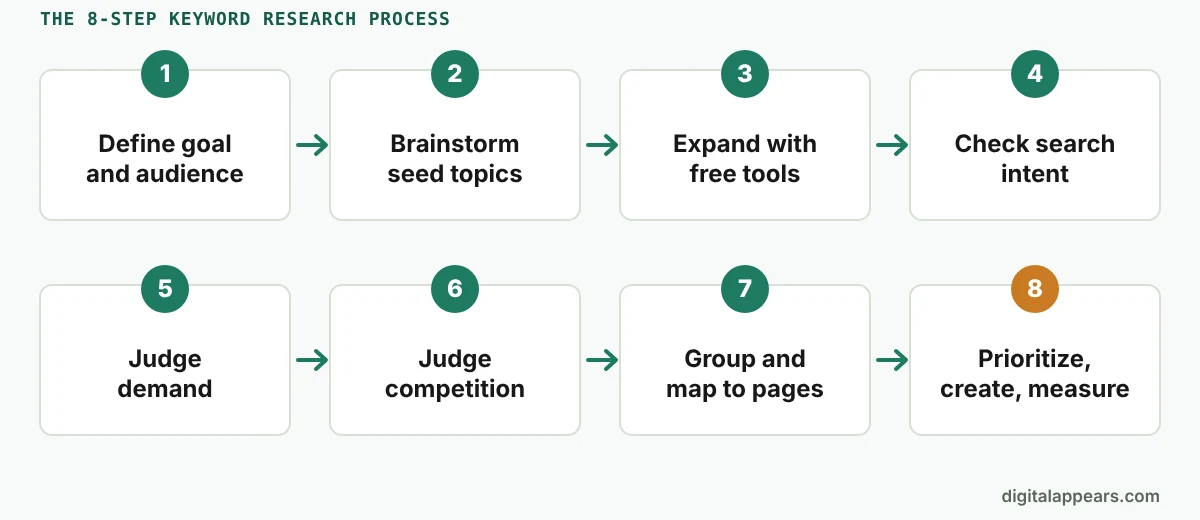
Define your goal and your audience
Do thisBefore you open any tool, write down what the page or site needs to achieve (leads, sales, calls, newsletter sign-ups) and who you want to reach. A plumber wants "calls from homeowners in one city". An online shop wants "product page sales".
Why it mattersA keyword is only worth anything if the person searching it could become a customer. Your goal tells you which keywords are relevant and which are just traffic.
Brainstorm seed topics
Do thisList 5 to 10 broad topics that describe what you sell or help with. Then add the sources closest to your customers:
- Questions customers ask on sales calls, emails and support chats
- Your services, products and categories
- Competitors' menus, category pages and blog topics
- Problems people describe in forums and reviews
ResultA list of seed topics such as "emergency plumber", "water heater repair" and "burst pipe". These are your starting points, not your final keywords.
Expand each topic with free tools
Do thisTake each seed topic and grow it into a list of related searches:
- Type the topic into Google and note the autocomplete suggestions. Add a letter or word after it ("water heater repair a", "water heater repair cost", "water heater repair near") to see more.
- Note the "People also ask" questions and the "Related searches" at the bottom of the page.
- Run the seed topic through Google Keyword Planner to see related ideas and estimated searches.
- Check Google Trends to see which phrasing people use more, and whether demand is seasonal.
- Paste everything into a spreadsheet, one keyword per row.
ResultA raw list of 50 to a few hundred keyword ideas. Don't filter yet.
Check the search intent
Do thisFor each promising keyword, search it yourself and look at what Google shows. The results tell you what searchers expect. Label each keyword with one of four intents:
| Intent | What the person wants | Example | Best page type |
|---|---|---|---|
| Informational | To learn something | how to fix a leaking tap | Guide or blog post |
| Commercial | To compare options before choosing | best water heater brands | Comparison or review page |
| Transactional | To buy or book | emergency plumber near me | Service, product or landing page |
| Navigational | To reach a specific site | [brand name] login | Your own brand pages |
Why it mattersIf every result for a keyword is a how-to guide, a product page won't rank for it, and the other way round. Match the page type Google already rewards. My post on zero-click answers versus deep content covers keywords where the results page itself answers the question.
Judge demand realistically
Do thisUse search volume to compare keywords against each other, not as an exact number. Keep these points in mind:
- Volumes are estimates. Different tools give different numbers for the same keyword, and Keyword Planner itself calls its figures estimates.
- Low volume can still be valuable. A keyword searched a few dozen times a month by people ready to buy can be worth more than a broad term searched thousands of times by browsers.
- Many searches never show up in tools. Long, specific questions are often hidden inside broader terms.
- Your own data beats any estimate. If you already have a site, Search Console shows real impressions.
Judge the competition by looking at the results
Do thisTool "difficulty" scores are a rough guide. For your top keywords, search them and look at page one:
- Who ranks? If page one is dominated by huge brands, marketplaces or government sites, it's a hard fight. If small sites and forums appear, there's room.
- How good is the content? Is it thorough, current and specific, or thin and outdated?
- Can you add something? Original data, real experience, a better explanation or a local angle can set you apart.
- How strong is your site on this topic? A new site usually has a better chance on specific, lower-competition phrases than on broad ones. Building depth on a topic also helps, which we cover in our topical authority playbook.
Group keywords and map them to pages
Do thisKeywords that mean the same thing, or that one page could satisfy, belong together. For example, "water heater repair", "fix water heater" and "water heater repair service" can all be answered by one page.
- Sort your list so similar keywords sit next to each other.
- For each group, pick one primary keyword (the clearest, most relevant phrase) and a few secondary keywords.
- Assign each group to one page, either an existing page or a new one.
- Check that no two pages target the same group. Two pages aiming at the same intent can compete with each other.
ResultA keyword map: every important keyword has a home, and every page has a job.
Prioritize, create, then measure
Do thisYou can't write everything at once. Score each keyword group from 1 to 3 on these factors, then start with the highest totals:
| Factor | Ask yourself |
|---|---|
| Business value | Would a searcher become a customer? (3 = ready to buy, 1 = just curious) |
| Demand | Is there enough interest to be worth the effort? |
| Winnability | Can we realistically compete on page one? |
| Effort | How hard is the page to make well? (3 = easy, 1 = very hard) |
Publish the best-scoring pages first. After a few weeks, check Search Console to see which queries each page actually appears for, then improve and repeat. Keyword research isn't a one-time job.
A worked example
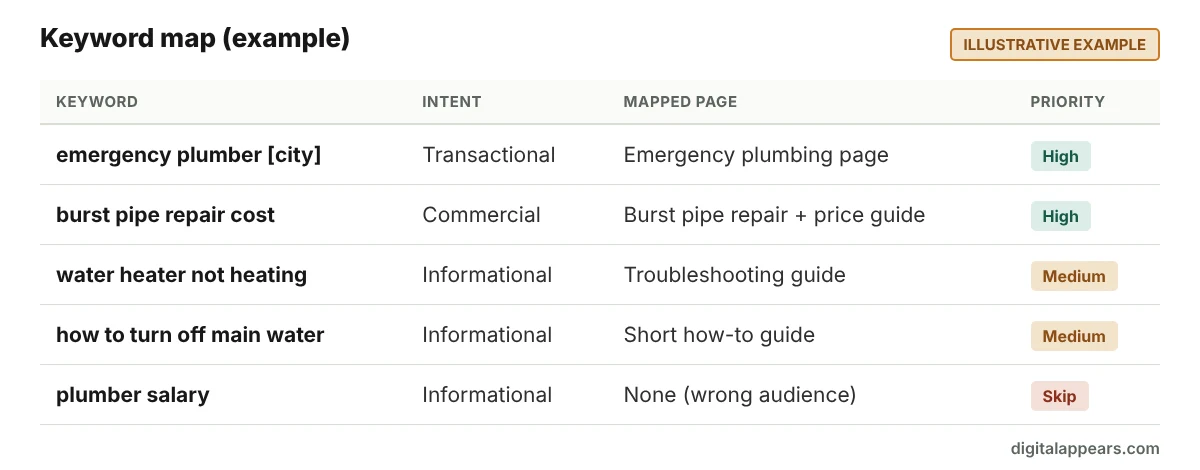
This illustrative example shows how the steps fit together for a local emergency plumber. The keywords are examples only, and I haven't shown volumes because they vary by location.
| Keyword | Intent | Page to map it to | Priority |
|---|---|---|---|
| emergency plumber [city] | Transactional | Emergency plumbing service page | High: ready-to-book searchers |
| burst pipe repair cost | Commercial | Burst pipe repair page with a price guide | High: strong buying signal |
| water heater not heating | Informational | Troubleshooting guide, linking to the repair service | Medium: attracts people who may need a plumber |
| how to turn off the main water supply | Informational | Short how-to guide | Medium: builds trust, lower direct value |
| plumber salary | Informational (wrong audience) | None | Skip: searchers aren't customers |
Notice the last row. The step that saves the most time is deciding what not to target. For a local business, also pair keyword research with a strong Google Business Profile, as covered in our local SEO work. Online shops can follow the same process for category and product pages, as explained under our e-commerce SEO service.
Quick wins from Search Console
If your site already has some traffic, Search Console may be your fastest source of keyword ideas, because it shows real queries that already bring you impressions.
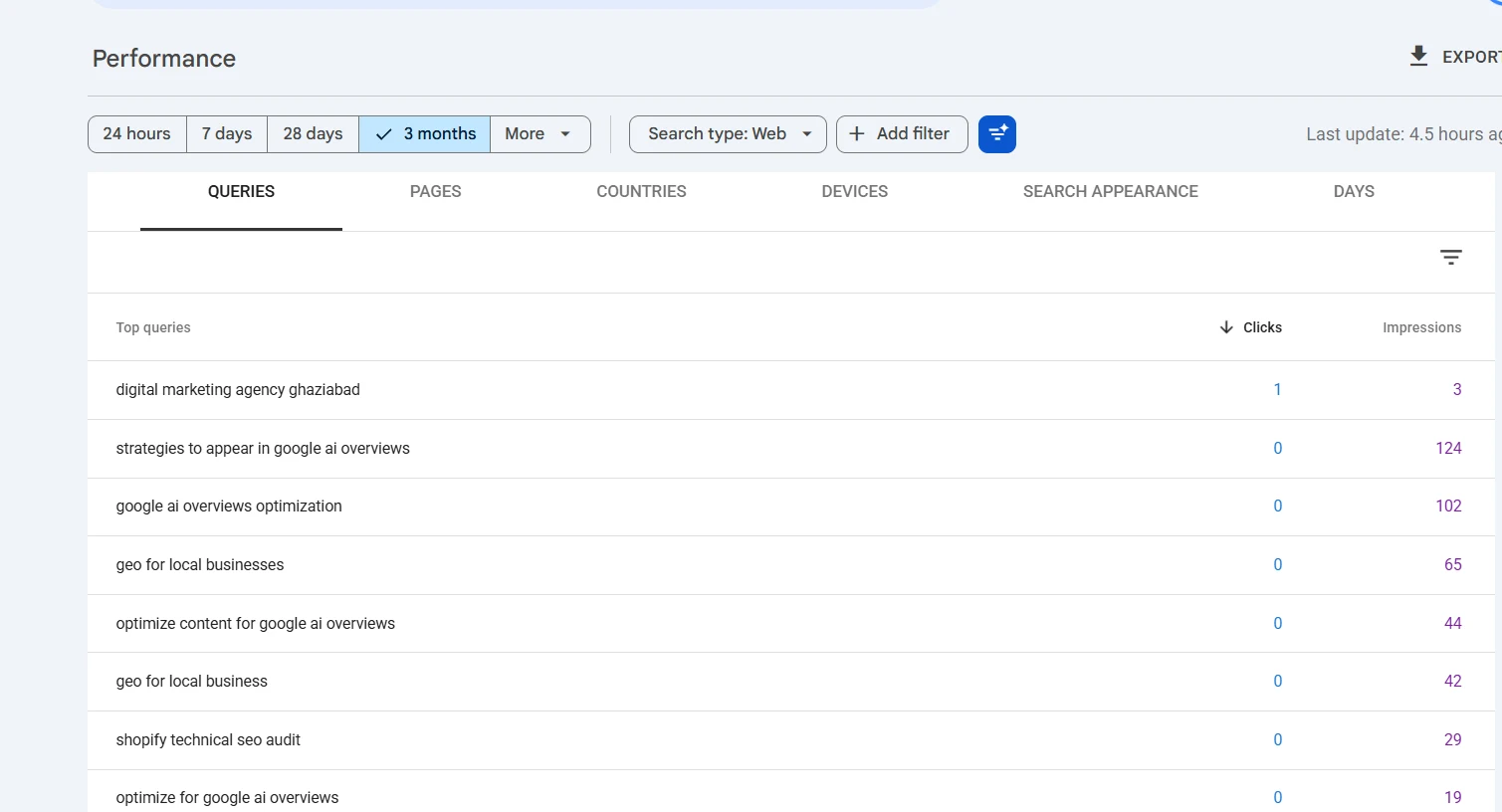
- Open the Performance report and set the date range to the last 3 months.
- Switch to the Queries tab and export the data to a spreadsheet.
- In the spreadsheet, filter for queries with an average position of about 8 to 20 (turn on the Average position metric in the report so the column is included in your export). These are pages that are close to page one, often called "striking distance" keywords.
- Sort by impressions. Queries with many impressions and a modest click-through rate are the best candidates.
- Improve the page that ranks: answer the query more directly, add a section, update outdated facts, improve the title, and add internal links to it.
One caution. Positions are averages across everything people searched, so use them to spot opportunities, not to measure exact rankings. Also look for queries that appear but don't match any page. Those are ideas for new content.
Keyword research for AI search
People now also ask AI tools and Google's AI features full, conversational questions, so it helps to think in questions as well as short keywords. The free sources above already point you to them: "People also ask", forums, customer emails and sales calls.
- List the full questions customers ask and answer each one clearly, early on the page.
- Cover a topic completely, rather than one phrase at a time, so your pages can answer the follow-up questions too.
- Google says there is no special optimization for AI Overviews beyond good SEO, so the same fundamentals apply. For more, read our guide to optimizing content for Google AI Overviews.
Search volume tools generally can't tell you how often people ask AI tools a particular question, so treat any such number with caution. Our GEO toolkit includes a prompt-testing log to track how your brand shows up in AI answers.
Common mistakes
- Chasing volume. The biggest keyword is rarely the best keyword. Relevance and intent come first.
- Ignoring search intent. Writing a blog post for a keyword where Google shows product pages (or the reverse) rarely works.
- Targeting the same keyword on several pages. The pages end up competing with each other.
- Treating difficulty scores as facts. They are tool-specific estimates. Look at the actual results.
- Stuffing keywords into text. Write naturally for the reader. Repeating a phrase unnaturally can hurt, and can run into Google's spam policies.
- Doing it once and forgetting. Go back to your list every few months as your site and the search results change.
Keyword research template
Copy this into a spreadsheet, one row per keyword. This is how a finished keyword map looks:
| Keyword | Intent | Est. demand | Competition (from the results) | Mapped page | Primary or secondary | Priority score |
|---|---|---|---|---|---|---|
FAQ
How do I do keyword research for free?
Use Google Search Console for the queries your site already gets, Google autocomplete, "People also ask" and "Related searches" for ideas, Google Trends to compare interest, and Google Keyword Planner for estimated volumes (it needs a Google Ads account with billing set up). Add forums and customer questions for real-world language.
What is the best free keyword research tool?
For a site that already has traffic, Google Search Console, because it shows real data. For finding new ideas, Google autocomplete and "People also ask" are the quickest. Keyword Planner is the main free source of volume estimates, though you must set up a Google Ads account first.
Do I need search volume to choose a keyword?
It helps, but it isn't the whole picture. Volume numbers are estimates, and low-volume keywords can convert well. Judge intent, relevance and how winnable the results are as well.
How many keywords should I target per page?
One primary keyword (the main topic) and a handful of closely related secondary keywords and questions. If two keywords need very different pages to satisfy the searcher, they belong on separate pages.
What is search intent?
It is the reason behind a search: to learn something (informational), compare options (commercial), buy or book (transactional) or reach a specific site (navigational). Look at what Google ranks for a keyword to see which intent it believes the searcher has.
What are long-tail keywords?
Longer, more specific phrases, such as "emergency plumber for burst pipe at night" instead of "plumber". They usually have fewer searches each, but the people searching are often closer to a decision and the competition is lower.
How often should I do keyword research?
Do a full round when you plan a site or a new section, then review your Search Console queries every month or two and refresh your list every few months. Re-check after big changes in your market or in search results.
Want a keyword map built for your business?
We research the terms your customers use, match them to pages and tell you what to write first. See our SEO services.
Talk to Us About Keyword Research