
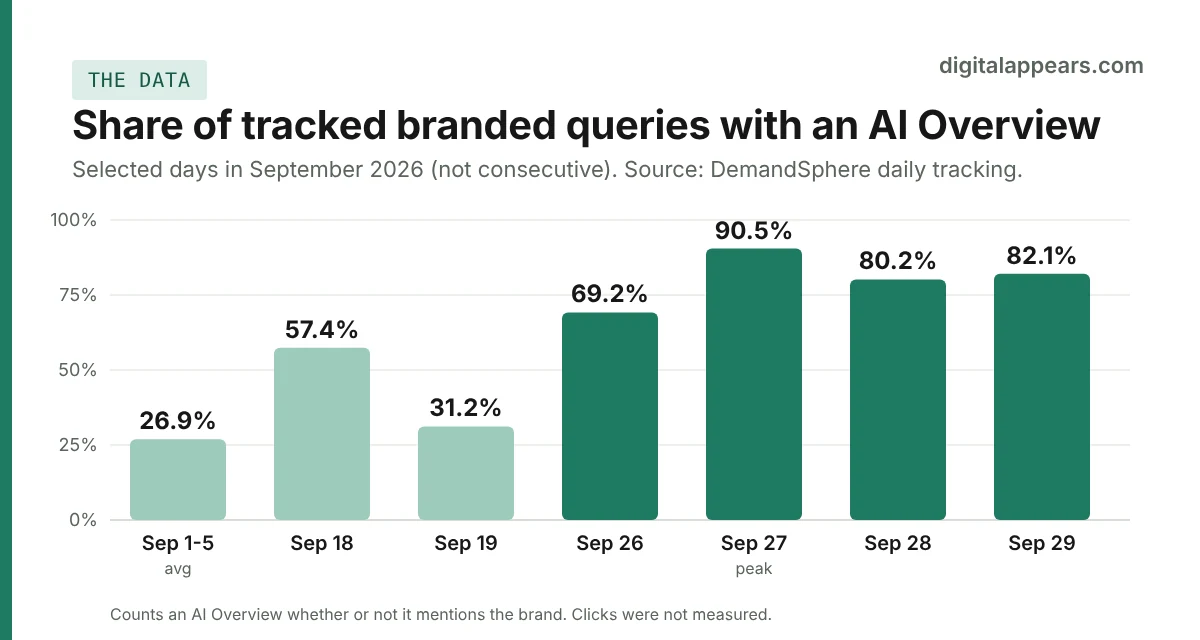
- Tracking data shows AI Overviews on branded searches jumped sharply in late September 2026. One tracker went from about 26% of branded queries to over 80%. A separate test found them on 93 of 100 big brands.
- Those two numbers measure different things, so don't merge them. And neither measured clicks, so nobody yet knows how much traffic brands are losing, if any.
- Google hasn't announced a change, and says there's no special optimization for AI Overviews beyond normal SEO.
- My plan for you: audit your brand queries, make your own pages the clearest source of brand facts, fix inconsistencies across the web, and watch your branded click data.
- You can't opt out of AI Overviews separately. Blocking snippets would hurt your normal brand listing too, so it is rarely the right move.
What the data actually says
Two sets of numbers are doing the rounds, and they're easy to confuse.
| Source | What was measured | Result |
|---|---|---|
| DemandSphere | Share of tracked branded keywords where an AI Overview appeared, checked once a day, all markets and devices, 1 to 29 September 2026 | About 26% in the first days of September. A peak of about 90% on 27 September, then roughly 80% to 82% on 28 and 29 September. |
| Chris Long (Nectiv) | 100 enterprise brands checked via SerpApi | AI Overviews appeared for 93 of the 100 brands |
The first is a share of queries. The second is a count of brands. A brand can show an AI Overview for one query and not another, so "93% of brands" doesn't mean "93% of brand searches." Some sites quoting 83% or 93% as one figure are mixing these up.
Three limits to keep in mind. DemandSphere's daily numbers swing a lot (one day in mid-September read 57%, the next 31%), so a single day is noisy. It counts an AI Overview as present whether or not it mentions the brand. And neither source measured clicks. Whether branded click-through rate has actually dropped is not known yet.
Google hasn't announced any change related to the increase. So treat this as an observed trend in tracking data, not a confirmed product decision.
What could go wrong for a brand
Branded searches are your most valuable ones. The person already knows you, and they usually click your site. An AI Overview at the top of that results page changes what they see first. These are risks worth checking for, not guaranteed outcomes:
- Wrong or outdated facts. Old pricing, a closed office, a discontinued service, or a mix-up with a similarly named company.
- Someone else's version of your story. The summary may lean on a review site, forum thread or competitor comparison instead of your own pages.
- Fewer clicks to you. If the summary answers the question, some people may not click, the same pattern behind zero-click searches. That's plausible for brand queries, but it hasn't been measured yet.
- Your brand missing from your own answer. The AI Overview may appear and cite other sites, but not you.
A 6-step protection plan
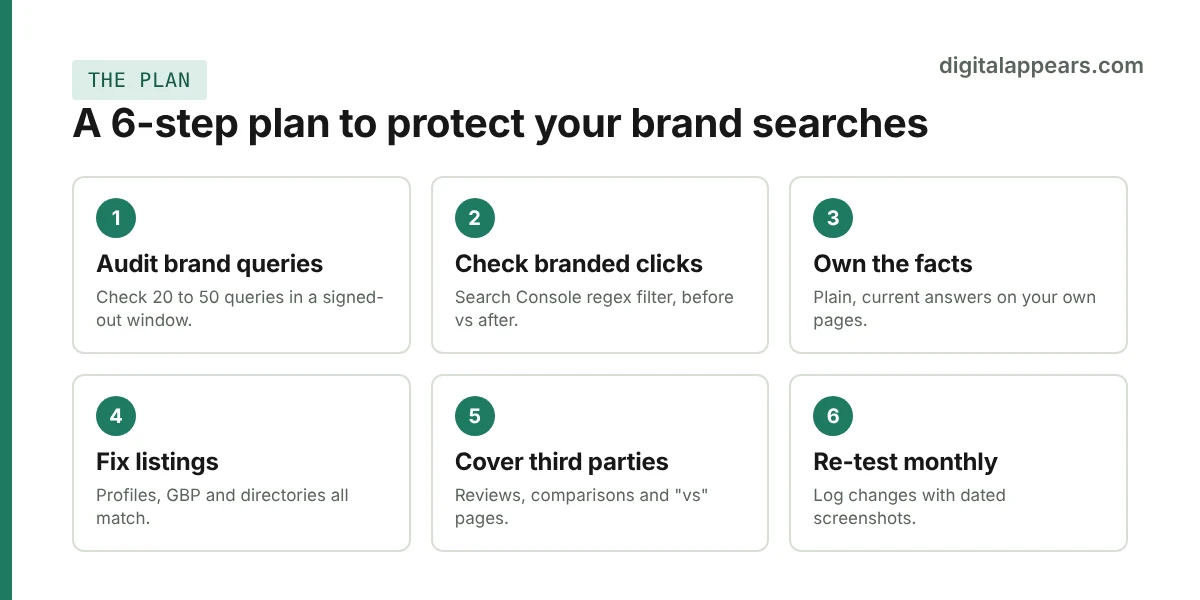
- Measure first. List your top 20 to 50 brand queries: your name, name plus "reviews", "pricing", "login", "contact", "vs [competitor]", and your product names. Search each one in a signed-out browser window and fill in a table like the one below. This takes an hour and tells you whether you have a problem at all. If you also want to see how much traffic AI tools send you, here is how to track AI traffic in GA4.
- Check your branded click data. In Search Console's Performance report, add a Query filter set to Custom (regex) with your brand name and common misspellings. Compare clicks, impressions, CTR and position for the weeks before and after late September. Google says traffic from its AI features is included in the Performance report under the Web search type, so this is the right place to look, but you can't separate AI Overview clicks from the rest.
- Make your own pages the clearest source of brand facts. Write plain, current answers to the questions people ask about you: what you do, who it's for, where you are, what it costs or how pricing works, how to contact you. Keep key facts in normal text, not only in images or scripts. Google's guidance for AI features is just standard SEO, with structured data matching the visible text. Covering your brand's topics clearly and consistently also builds topical authority. Our guide on optimizing content for Google AI Overviews covers the content side.
- Fix inconsistencies across the web. Make your name, address, phone, description and links match everywhere: Google Business Profile (our local SEO work covers this), LinkedIn, social profiles, directories and any Wikidata entry you are eligible for. Claim your Knowledge Panel if you have one. If an AI Overview states something wrong, use its feedback option, and fix the source it relied on. Be realistic: these are sensible steps, but there is no solid evidence yet showing how fast, or whether, they change an AI answer.
- Cover the third-party space. If review sites, forums or comparison pages dominate your brand results, respond to reviews, keep your profiles current, and publish honest versions of the pages people search for, such as "[your brand] vs [competitor]" and "[your brand] pricing."
- Re-test monthly and log it. Repeat the query check, note any changes, and keep dated screenshots. When a wrong answer disappears, you want to know what you changed. For a structured way to run these checks across AI tools, the GEO & AI Citation OS includes a prompt testing and results log.
Brand query audit template
Copy this into a sheet, one row per query, each checked in a signed-out window.
| Brand query | AI Overview shown? | Does it cite you? | Is it accurate? | Who else is cited? | Action |
|---|---|---|---|---|---|
| [brand name] | |||||
| [brand] reviews | |||||
| [brand] pricing | |||||
| [brand] vs [competitor] |
What Google lets you control (and what it doesn't)
Per Google's own documentation on AI features and your website:
- A page must be indexed and eligible to show with a snippet to appear in AI Overviews. There are no extra technical requirements, and no special schema or AI text file to add.
- The documented controls are
nosnippet,data-nosnippet,max-snippetandnoindex. Google doesn't describe a separate opt-out for AI Overviews. It says AI is built into Search. - Google-Extended is for limiting AI training and grounding in some other Google systems. It is not a switch for Search's AI Overviews.
Think twice before restricting snippets. Those controls limit how your pages appear in all of Search, including your normal brand listing. For most businesses, losing your own snippet to avoid an AI summary is a bad trade.
What not to do
- Don't panic over a tracker number. Wait for click data from your own Search Console before you change strategy.
- Don't add fake or keyword-stuffed brand FAQ pages. It won't earn a rich result (Google ended FAQ rich results in May 2026), and thin pages can fall foul of Google's spam policies.
- Don't edit Wikipedia or Wikidata dishonestly. Those communities enforce sourcing rules, and a promotional edit can backfire.
- Don't treat brand ads as automatic. Some brands pay to hold the top of their own results. Weigh the cost against your actual organic click data first.
- Don't promise clients a fix. Nobody outside Google can guarantee what an AI Overview says about a brand.
FAQ
Are AI Overviews really showing on most branded searches?
Tracking data points that way. DemandSphere's September 2026 tracking went from about 26% of branded queries to over 80% by late September, and a separate test found AI Overviews on 93 of 100 enterprise brands. They measure different things, the data is early and volatile, and Google hasn't announced a change.
Do AI Overviews on brand searches reduce clicks to my website?
Not yet known. Neither main data source measured clicks. The effect is plausible, but you should check your own branded click-through rate in Search Console before assuming a loss.
Can I opt my brand out of AI Overviews?
Google doesn't describe a separate opt-out. The documented controls (nosnippet, data-nosnippet, max-snippet and noindex) affect how your pages show in all of Search, so they usually aren't a good choice for brand pages.
What do I do if an AI Overview says something wrong about my business?
Document it with a dated screenshot, use the feedback option on the AI Overview, and fix the source information it likely relied on: your own pages, your Google Business Profile, and consistent listings elsewhere. There is no proven timeline for the AI answer to change.
Is there special schema markup for AI Overviews?
No. Google says there are no additional requirements or special optimizations beyond standard SEO. Structured data you add should match the visible text on the page.
How do I see AI Overview traffic in Search Console?
Google says traffic from AI features is included in the Performance report under the Web search type. It isn't separated out, so filter for your brand queries and compare equal periods before and after the change.
Want a brand search audit?
We'll check how AI Overviews treat your brand queries, flag inaccurate answers, and show what is worth fixing first. It fits alongside our SEO services.
Book a Brand Search AuditSources
- DemandSphere: AI Overviews on branded queries tripled in September
- Search Engine Land: Google AI Overviews jump from 26% to 80% of branded queries (includes Chris Long's 100-brand test)
- Google Search Central: AI features and your website
- Onely: How to Fix Incorrect AI Brand Information (practitioner guidance, effectiveness unproven)