
My checklist for making sure your framework's biggest strengths don't quietly cost you search and AI visibility.
Key takeaways
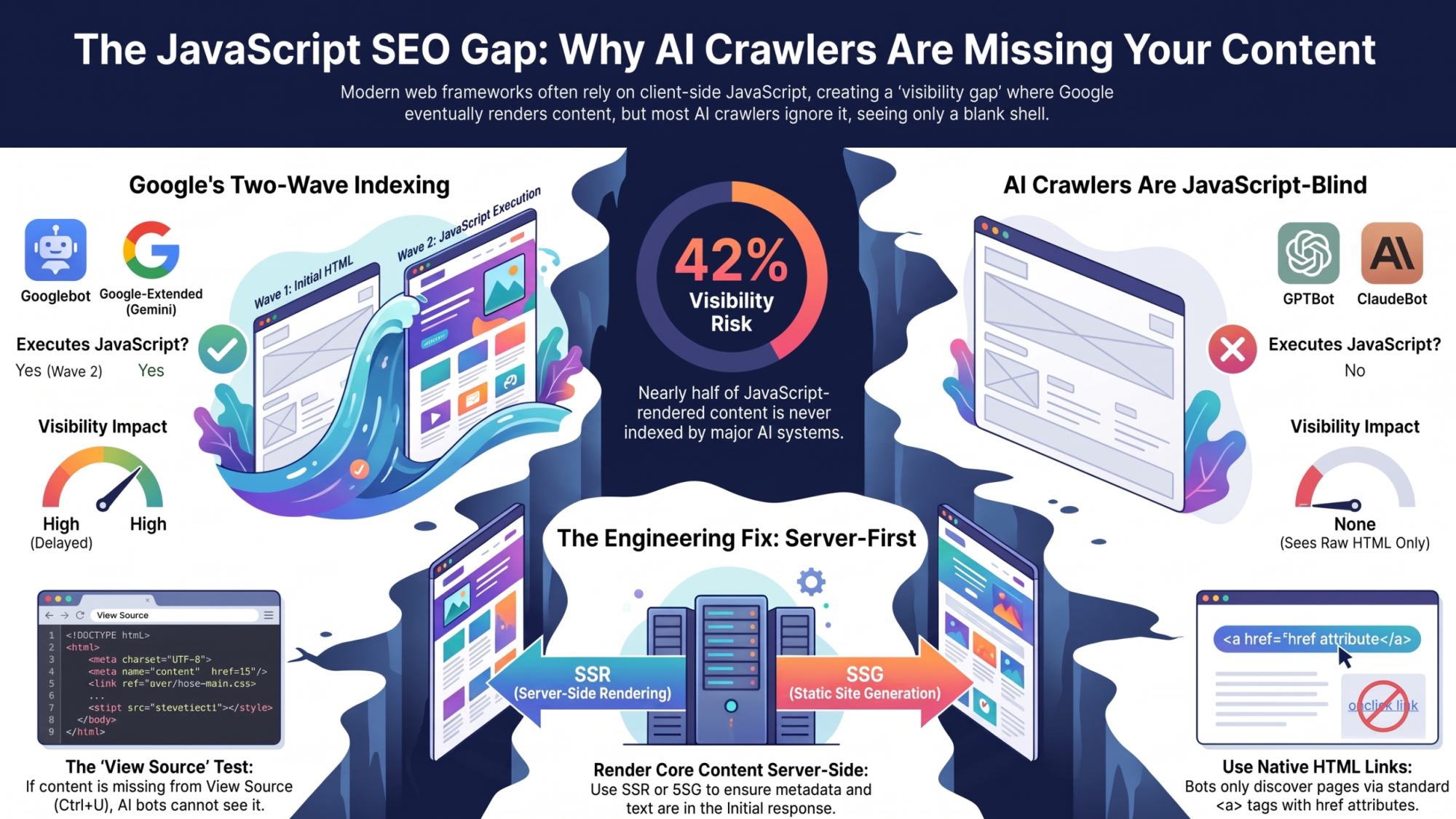
- Google indexes JavaScript in two waves. Content that only appears after client-side execution can sit in a render queue for hours or days before Google ever sees it.
- Most AI crawlers, including GPTBot, ClaudeBot, and PerplexityBot, do not execute JavaScript at all. They only ever see your initial HTML response.
- A page can rank first on Google and be a completely blank shell to ChatGPT, Claude, and Perplexity at the same time.
- Hydration mismatches can silently strip server-rendered content and replace it with a loading state that bots capture before the real content re-renders.
- The fix for nearly every issue here is the same: render core content, metadata and structured data server-side, and keep client-side JavaScript for enhancement, not for anything you need indexed.
On this page
The Modern Web Problem: Developer Speed vs. Search Indexing
Modern frontend frameworks exist to make developers faster. React, Vue and their meta-frameworks let a small team ship complex, interactive interfaces without hand-rolling every page. That speed comes from moving work that used to happen on the server onto the client, a build step, or a rendering queue somewhere in between. Search crawlers weren't built with that shift in mind.
The business cost shows up quietly. A product page that renders perfectly in a browser can sit unindexed for days because its content only exists after JavaScript runs. A pricing update pushed at 9am can still show yesterday's number in search results a week later. Crawl budget gets spent re-fetching JavaScript bundles and API calls instead of discovering new pages. None of this throws an error. It just slowly erodes visibility until someone notices organic traffic has stalled and starts asking why.
How Search Engines Process JavaScript: Wave 1 vs. Wave 2
Google's indexing pipeline was long described as two waves, and the mental model still holds even though the system underneath has evolved. In Wave 1, Googlebot crawls the raw HTML response, indexes whatever content is already in that markup, and extracts links to queue for crawling. None of this needs JavaScript execution.
Wave 2 is where JavaScript-dependent content gets its chance. Pages that need client-side execution are queued into Google's Web Rendering Service, which runs the JavaScript when compute is available and captures the resulting DOM. The queue isn't instant. Delays of hours to days are common, and for anything time-sensitive, like a price, a stock status or a limited-time offer, that can mean Google indexes information that's already stale by the time it's processed.
The AI Crawler Blind Spot: Why LLMs See Even Less Than Googlebot
This is the part most JavaScript SEO guides still miss. Everything above assumes Google eventually renders your JavaScript. Most AI crawlers never do.
GPTBot, ClaudeBot, PerplexityBot and OAI-SearchBot fetch the raw HTML response and pull out whatever text is already in that markup. They don't execute JavaScript, wait for a render queue, or retry after a client-side fetch resolves. Crawler-log analyses covering hundreds of millions of GPTBot requests found no evidence of JavaScript execution at all, and separate research found GPTBot and ClaudeBot occasionally download JavaScript files without ever running them.
The one meaningful exception is Google-Extended, the crawler that feeds Gemini and Google's AI Overviews. Because it inherits Googlebot's rendering infrastructure, it can see JavaScript-rendered content the same way regular Google Search does. Microsoft's Copilot leans on Bing's index, and Bingbot's JavaScript rendering is more limited than Google's. Every other major AI crawler in wide use today reads only what arrives in the initial HTML response.
The practical result is a visibility split that didn't exist a few years ago. A client-rendered single-page app can rank first on Google, where the Web Rendering Service eventually catches up, and still be a completely empty shell to ChatGPT, Claude and Perplexity. One 2026 industry analysis estimated that around 42% of JavaScript-rendered content never gets indexed by AI systems at all, a blind spot a purely Google-focused audit will never surface.
This changes what you should fix first. It's no longer enough to confirm a page eventually gets indexed by Google. If you want to be cited in AI answers, the only test that matters is whether the content is in the raw server response with zero JavaScript execution, because that's the exact condition every major AI crawler works under.
Rendering Architecture: How Search Bots Experience Your Stack
Client-Side Rendering (CSR): High Risk for Critical Content
A CSR app typically serves a near-empty HTML shell, often literally <div id="root"></div>, and depends entirely on JavaScript to build the actual page. For Googlebot, that makes every page a Wave 2 candidate by default. For AI crawlers, the page is functionally invisible, since there's nothing in that initial response to extract.
CSR also introduces failure modes that have nothing to do with whether a bot can technically run JavaScript. API timeouts during rendering, third-party scripts that block the main thread, and render queues that don't wait long enough for slow client execution can all leave a bot capturing an incomplete or empty page, even when the site works fine for a human on a fast connection.
Server-Side Rendering (SSR) and Static Site Generation (SSG): The Safe Default
Pre-rendering, whether on the server per request (SSR) or at build time (SSG), takes the Web Rendering Service queue out of the picture for Google. It's also the only approach that reliably works for AI crawlers, since the content is already in the initial HTML.
SSR generates the full HTML for each request as it comes in, which suits pages with frequently changing, personalized or real-time content. SSG pre-builds static HTML at deploy time and serves it from the edge, which suits content that changes rarely and benefits from being as fast as possible with no server compute per request.
Hybrid Rendering and Incremental Static Regeneration (ISR)
Modern meta-frameworks like Next.js App Router and Nuxt blend these models. Incremental Static Regeneration lets a page be built statically but revalidated on a schedule or on demand, without rebuilding the whole site. Done right, you get SSG-level crawler visibility with content that stays reasonably fresh.
Done wrong, it can serve a stale or partly-unrendered shell to bot user agents if cache-control headers and revalidation windows aren't configured deliberately. Test any hybrid setup with a bot-facing request, not just a browser request, to confirm the cached response actually contains the content you expect.
Hydration Failures: The Visibility Killer Nobody Checks For
What Hydration Is and How It Breaks Visibility
Hydration is the process of attaching client-side JavaScript event listeners and state to HTML that was already rendered on the server. It's what turns static-looking markup into an interactive app without a full re-render from scratch. When the DOM the client expects doesn't match the DOM the server sent, frameworks typically discard the mismatched portion and re-render it on the client, a full-tree re-render sometimes called DOM thrashing.
Content Drops and DOM Node Overwrites
Badly handled hydration can strip out server-rendered elements like body copy, headings and specification tables, and replace them with a temporary loading state before the real content re-renders on the client. Bots that capture the page during that window record the empty or loading state, not the actual content, even though a human visitor would never notice the flicker.
Client-Side Overwrites of Head Metadata
The same problem gets worse when it hits your <head>. If the raw HTML ships a generic fallback <title>, <meta name="description"> and <link rel="canonical">, and the real page-specific values are only set client-side inside a useEffect hook or a client-side router, Google frequently indexes the fallback text instead of the values you wanted. AI crawlers never run that client-side code, so they'll see only the fallback, every time.
The Production JavaScript SEO Checklist
1. Crawlability, Resources, and Bot Directives
Check your robots.txt for accidental blocks on .js, .css or backend API endpoints. Blocking an external API domain, for example api.example.com, is a common mistake that leaves the Web Rendering Service with a blank page to render, because the data it needs never loads. Also confirm HTTP status codes behave: an unauthenticated client route shouldn't return a 200 OK wrapped around what is really a client-side 404 or redirect, since that tells crawlers a broken page is healthy.
2. Link Extraction and DOM Discovery
Crawlers, both Googlebot and AI crawlers, discover new pages mainly by extracting the href attribute from native HTML <a> tags. This is the one rule most JavaScript navigation bugs break. Watch for:
- A
<span onClick={goToPage}>or a<button>used for page navigation instead of an anchor tag <a href="javascript:void(0)">, which gives a crawler nothing to follow- Hash-based routing (
/#/category) instead of the HTML5 History API (pushState), which produces URLs crawlers may not treat as distinct, indexable pages
3. Progressive Loading, Infinite Scroll, and Pagination
Bots don't scroll, hover or click a "Load More" button. Any content gated behind those interactions is content a crawler will never see. Infinite-scroll interfaces should always ship standard fallback pagination links, for example <a href="?page=2">, alongside the scroll experience, so the same content is reachable through a plain, crawlable URL.
4. Structured Data and Schema Resilience
JSON-LD structured data should be baked directly into the initial server-side HTML response, not generated through a third-party tag manager or injected by a delayed client script. Schema that only appears after client-side execution gets the same Wave 2 delay as any other JavaScript-dependent content on Google, and it's invisible to AI crawlers entirely.
Diagnostic Workflow: How to Audit and Debug JavaScript Issues
View Source vs. Inspect Element (The Baseline Test)
These are two different documents, and mixing them up is the most common mistake in JavaScript SEO audits. View Source (Ctrl+U) shows the raw server response exactly as a non-rendering crawler gets it. Inspect Element, or the DevTools Elements panel, shows the hydrated DOM after JavaScript has run. Any core content or metadata missing from View Source depends entirely on JavaScript to exist, which means it's invisible to every AI crawler in use today.
Disabling JavaScript in Browser DevTools
In Chrome DevTools, open Settings, find the Debugger section, tick "Disable JavaScript" and reload the page. What breaks is exactly what a non-executing crawler experiences. Can you still read the core content? Are links clickable? Can you reach the main navigation? If the answer to any of these is no, that content or navigation path doesn't exist for GPTBot, ClaudeBot or PerplexityBot.
Terminal and Command-Line Inspection (curl)
To see exactly what a crawler receives, request the page with a bot user agent:
# Repeat with a GPTBot or ClaudeBot user agent string to check AI crawler visibility specifically,
# since they will not execute anything this request returns.
Check the response headers for X-Robots-Tag, confirm the HTTP status code is what you expect, and look at the initial HTML size. A page that should have a full article or product description but returns only a few kilobytes of markup is very likely shipping an empty shell to any crawler that doesn't execute JavaScript.
Headless Crawler Comparisons (HTTP vs. Rendered)
Tools like Screaming Frog and Sitebulb can run two crawls of the same site, one with the default HTTP or text-based engine and one with full Chrome rendering. Compare the two exports for word count differences, missing internal links and stripped structured data. In practical terms, the gap between them is the gap between what an AI crawler sees and what Googlebot eventually sees.
Quick-Reference: Common Pitfalls and Technical Fixes
| Architectural Pitfall | Search Engine Impact | Engineering Fix |
|---|---|---|
| Clickable <span> or <button> navigation | Crawler stops; deep URLs remain orphaned | Replace with a standard <a href="/target"> |
| Client-only canonical injection | Wrong URL indexed, or canonical loops | Render <link rel="canonical"> server-side |
| Lazy-loaded text behind interaction | Text is omitted from search indexing | Render primary copy in the initial DOM; lazy-load images only |
| Blocked API routes in robots.txt | WRS fails to fetch content, leaving pages blank | Allow bot access to all rendering endpoints |
| Content only rendered via client-side JS | Invisible to GPTBot, ClaudeBot, and PerplexityBot entirely | Serve core content and metadata in the initial server response |
Building Search-Ready Web Apps
Balancing Speed, Usability and Crawl Efficiency
Modern frontend frameworks and search visibility aren't in conflict. The principle that resolves nearly every issue here is the same: use server-first rendering for core content, primary navigation and structured metadata, and keep client-side JavaScript for the interactivity layered on top, not for anything you need indexed or cited.
Work With Me on Technical Search
Fixing rendering bottlenecks, getting out of crawl traps and building search-resilient frontends takes hands-on work. If your team is running a headless stack, migrating to a modern JS framework or troubleshooting persistent indexation drops, I can help with technical SEO and search architecture audits.
Shishir Goel
Technical SEO consultant at Digital Appears. I work on rendering, crawl budget and frontends that hold up in search.
Frequently Asked Questions
Do ChatGPT, Claude, and Perplexity render JavaScript the way Google does?
No. GPTBot, ClaudeBot, and PerplexityBot fetch the raw HTML response and do not execute JavaScript at all. Google-Extended, which feeds Gemini and AI Overviews, is the exception, since it inherits Googlebot's rendering infrastructure.
Why does my page rank on Google but never get cited by ChatGPT or Perplexity?
The most common cause is client-side rendering. Google can eventually render your JavaScript through its Web Rendering Service, but AI crawlers do not execute JavaScript, so they only ever see whatever exists in the initial HTML response. If your core content is injected after the page loads, Google may index it while AI systems see an empty shell.
How long does Google's Wave 2 rendering actually take?
It varies, and Google has not published a fixed SLA. Delays ranging from hours to several days are common depending on crawl budget and site-wide rendering demand, which is one reason time-sensitive content should not depend on client-side rendering.
Is server-side rendering required, or can prerendering services fix a CSR site?
A prerendering or dynamic rendering layer that serves a fully-rendered HTML snapshot to bot user agents can work as a stopgap for an existing CSR application. For new builds, SSR, SSG, or a hybrid model is the more durable foundation, since it removes an extra moving part that has to be maintained and kept in sync with the live site.
Does using Next.js App Router or Nuxt automatically solve JavaScript SEO?
It gives you the tools to solve it, not a guarantee. Incremental Static Regeneration and hybrid rendering can deliver SSG-level crawler visibility, but only if cache-control headers, revalidation windows, and metadata rendering are configured deliberately. A misconfigured hybrid setup can still serve a stale or unrendered shell to bots.
Not sure what your own site looks like to a non-rendering crawler?
I run rendering and hydration audits as part of every technical SEO engagement, checked against both Googlebot and the AI crawlers that don't execute JavaScript at all.
Talk to Digital Appears about a technical SEO audit →Related reading