
- Google Search Console now lets you add your Instagram, TikTok, X and YouTube accounts as properties, to see how your posts perform in Google Search and Discover.
- You get the usual Performance, Insights and Achievements reports. You don't need a website to use it.
- It does not show views, plays or likes on the platform itself. It only covers how your content shows up and gets clicked in Google.
- Data takes a few days to appear, and it isn't backfilled. The sooner you add your accounts, the sooner you start collecting history.
- It is rolling out gradually, so you may not see it yet.
What changed
Until now, Search Console was a website tool. You proved you owned a site, and Google showed you how that site performed. The new platform properties extend that to social and video accounts. You can add Instagram, TikTok, X and YouTube, and Search Console shows how your posts and videos appear and get clicked in Google Search and Discover.
Google announced this on 7 July 2026, in a post by Moshe Samet, the Product Manager Lead for Search Console. It builds on an earlier experiment from December 2025 that added social channel data to the Insights report, but that version needed a verified website. Platform properties don't, so creators without their own site can use them too.
It's also different from Search profiles, which Google introduced in June as public profile pages for creators and publishers. Search profiles are for people to see. Platform properties are analytics for you.
Google is rolling this out gradually over several weeks, so if you don't see the option yet, check again later.
How to add your social accounts
- Open Search Console and sign in with the Google account you want to own the property.
- Click Add property. You'll find it on the welcome screen or at the bottom of the property selector at the top left.
- Choose a platform. In the "Select a property type" box, scroll to the "New" section and click Add next to Instagram, TikTok, X or YouTube.
- Follow the prompts to authorize the connection. Google describes this as a way to securely verify that you own the account.
- Click Go to property when verification finishes.
- Repeat for every account. Each account or channel needs its own property.
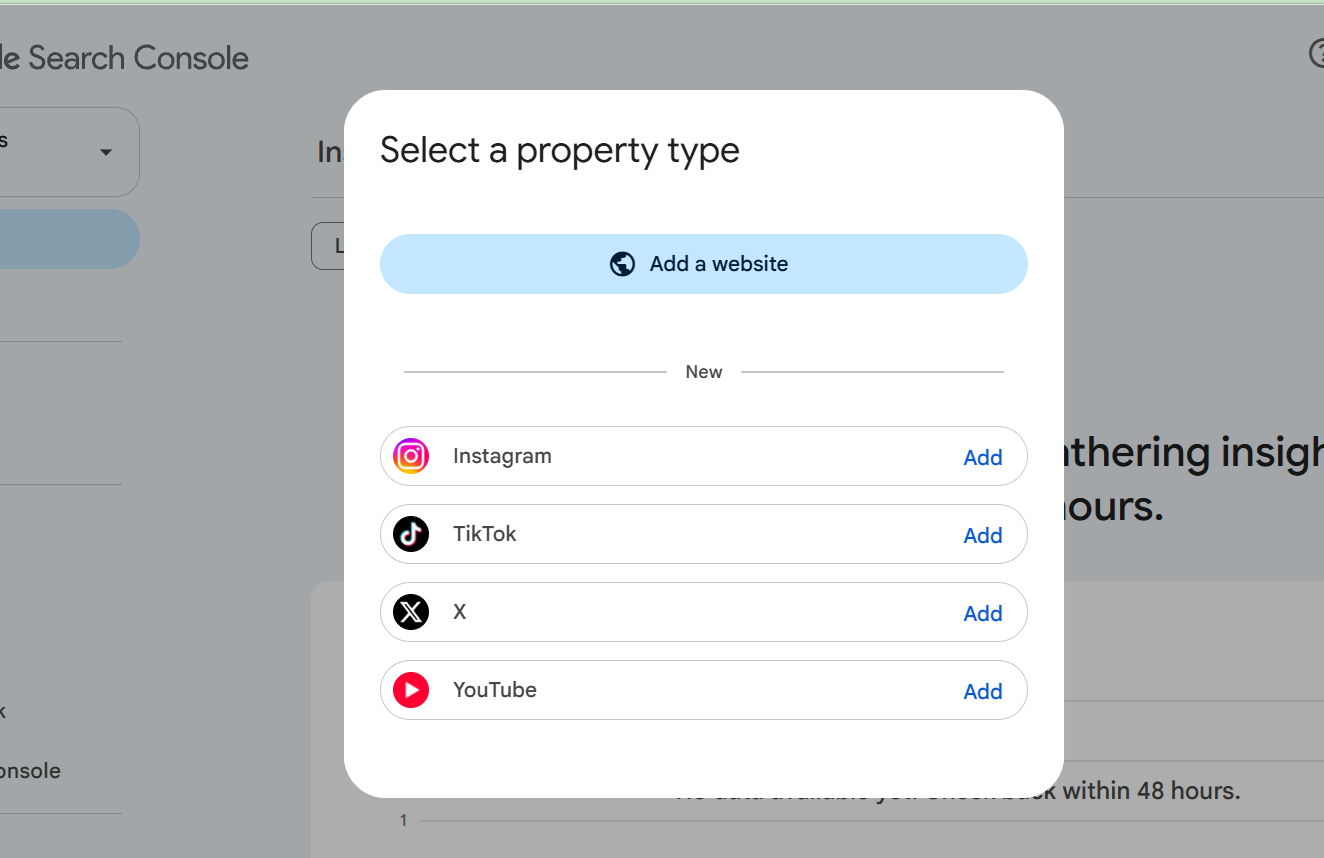
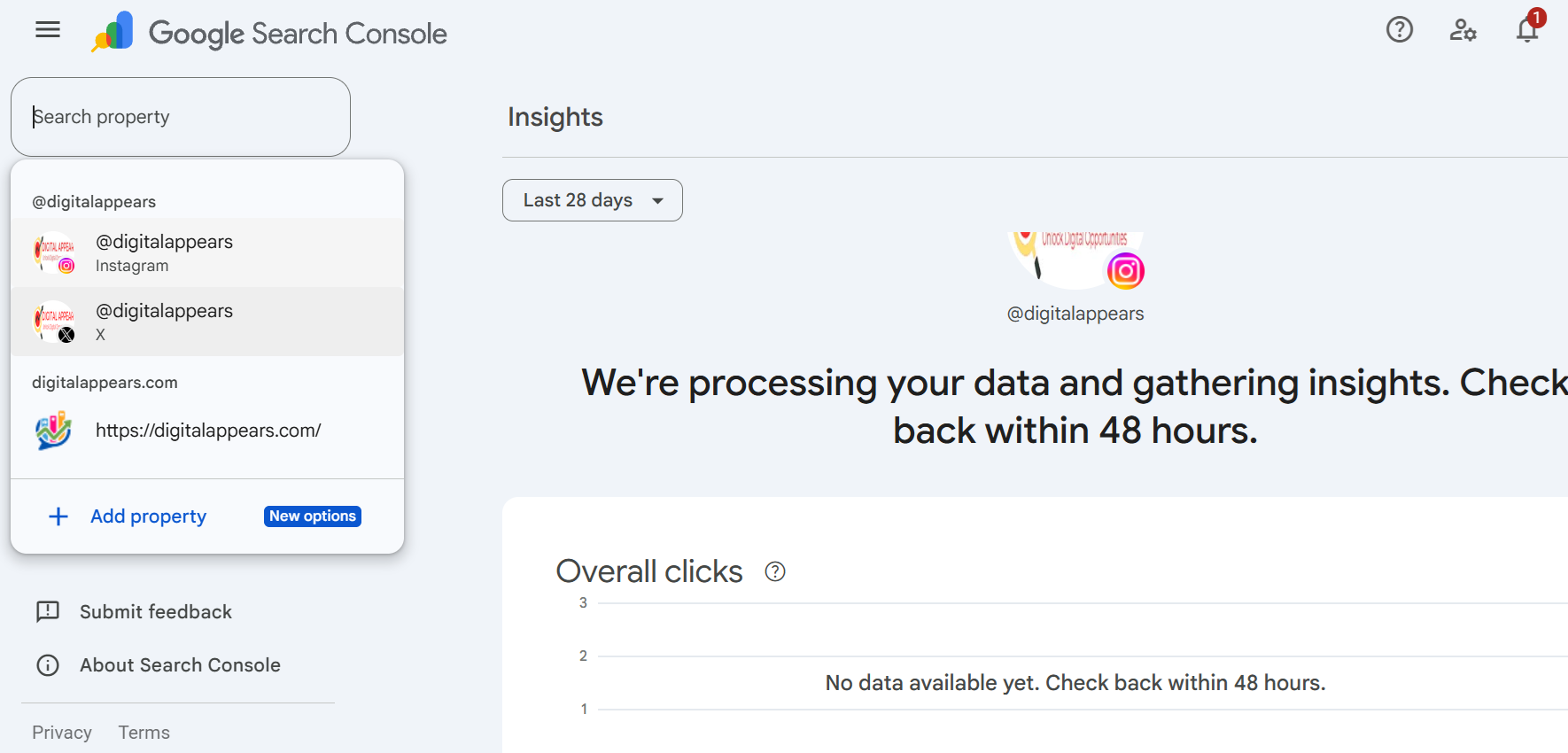
Once added, your accounts appear in the same property list as your website, grouped by handle. Here, @digitalappears shows up for both Instagram and X, next to the website property.
Don't see "New" in the box? Google is rolling this out gradually. If you don't see the social options yet, you will in the coming weeks. I couldn't find a published account-type requirement (for example, a particular kind of Instagram account), so follow whatever the verification step asks for.
What the reports show
Each social property gets its own set of reports, with a default date range of 28 days.
| Report | What it shows |
|---|---|
| Performance | Clicks, impressions, average click-through rate and average position in Google. You can filter by post and by query, sort to find your top posts, and export the data. |
| Insights | Recent traffic trends, your top-performing posts, and how people find your account through Google. |
| Achievements | Milestones, such as passing a new click total from Search within a 28-day period. |
Discover and Google News sections only appear if your content actually gets traffic from those places. Instagram stories and videos that show up in Google count as impressions, and a click counts even if the video opens inside Google's own viewer.
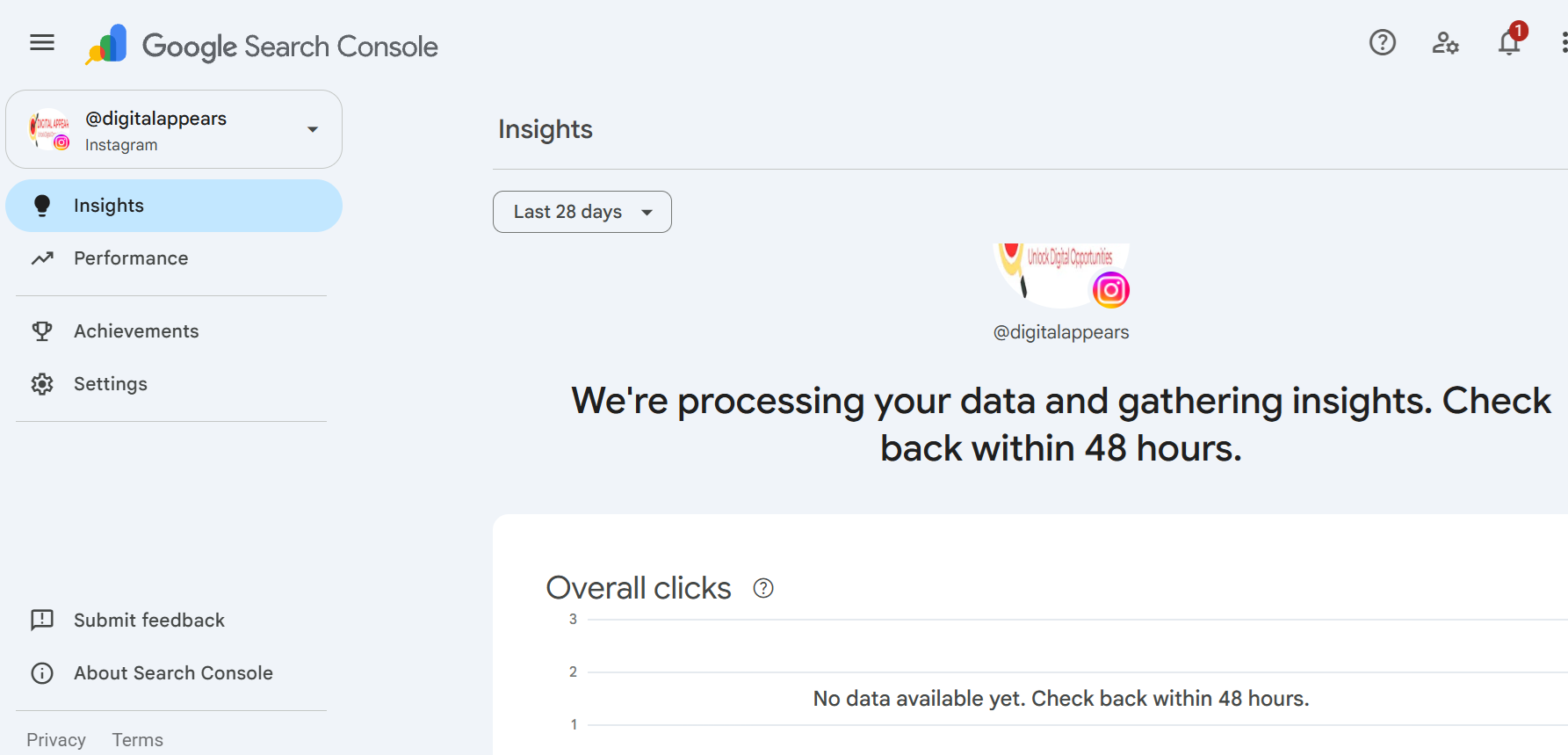
Expect an empty start. When I added mine, the Insights screen said "We're processing your data and gathering insights. Check back within 48 hours." Google's help page is less specific and says it will take "a few days" for data to appear. New properties may show empty charts, or partial data covering only the days since collection began. Google doesn't backfill earlier activity.
What it doesn't do
- It doesn't show on-platform numbers. Google says platform properties don't track views on the platform itself, so there are no TikTok plays, Instagram reach or X impressions here. For those, you still need each app's own analytics.
- Insights totals can differ from Performance. The summary cards in Insights cover all Google surfaces, but the detailed cards cover web search only, so their totals can be lower.
- Access can pause. Google checks ownership from time to time. If the connection breaks, for example because a login expired, reporting pauses until you verify again. After that you get your reports back without waiting for data to rebuild.
- It's one property per account. I haven't seen a bulk import or a combined cross-platform dashboard described.
How to use it
These are practical ideas of mine, not something Google prescribes. The reports show what already works in Google, so you can do more of it.
- Find posts that Google already shows. Sort Performance by clicks to see which posts, reels or videos get found through Search and Discover, then make more like them.
- Look at the queries. The queries that lead people to your posts show the words they actually use. Work those phrases into your captions, titles and descriptions where they fit naturally.
- Split your Google traffic from your in-app traffic. A post that does well on the platform may do nothing in Google, and the reverse. Seeing both helps you decide where each type of content belongs.
- Connect it to your website data. Pair this with your site's Search Console and with GA4 traffic tracking to see how social content, search and AI tools send you visitors. If your brand queries now show AI summaries, see our guide on AI Overviews on brand searches.
If you'd like help turning this data into a content plan, see our social media marketing and SEO services, or compare options on our packages and pricing page.
Do this today
- Open Search Console and look for the social options under Add property
- Add each account you want to track (Instagram, TikTok, X, YouTube) as its own property
- Complete the verification for each one
- Note the date you added them, since data starts from then
- Check back in a few days, then again after 28 days, and save the top posts and queries
FAQ
Can I add Instagram, TikTok, X and YouTube to Google Search Console?
Yes. Google's platform properties support Instagram, TikTok, X and YouTube. Use Add property in Search Console, choose the platform, and follow the verification steps. It's rolling out gradually, so you may not see it yet.
Do I need a website to use it?
No. Google says the feature is available even to creators who don't have their own website. The earlier experiment from December 2025 needed a verified website, but platform properties don't.
Does Search Console show my social media likes and views?
No. It only shows how your posts and videos perform in Google Search, Discover and Google News: clicks, impressions, average click-through rate and average position. It doesn't track views or plays on the platform itself.
How long until data appears?
Google's help page says it will take a few days. A new property can show empty charts or partial data at first, and earlier activity isn't backfilled. The Insights screen on a new property told me to check back within 48 hours.
Do I need a separate property for each account?
Yes. If you have several accounts or channels, you add one property for each.
What is the difference between platform properties and Search profiles?
Search profiles, introduced by Google in June 2026, are public profile pages for creators and publishers. Platform properties are private analytics reports for the accounts you own.
Want social and search reporting in one place?
We'll help you set up your accounts, read the data, and work out which content Google actually sends people to. See our social media marketing services.
Talk to UsSources
- Google Search Console Help: Platform properties
- Google Search Central Blog: See how content from social and video platforms performs on Google Search
- Google Search Central Blog: Platform properties roll out globally, plus a new social and video performance guide
- Search Engine Journal: Google Search Console Adds Reports For Social Posts
- PPC Land: Google adds Instagram, TikTok, X and YouTube data to Search Console